Site Crawler — Complete Tool Guide
Why This Tool Exists
Every website eventually accumulates problems that no one notices by browsing it normally: a batch of pages quietly returning a 404, two blog posts with the exact same title tag, a product page that got orphaned when a menu was redesigned last year, or a whole city-page template that Google might treat as duplicate content. Finding these issues requires actually crawling the site page by page, the way a search engine would — and the tool that’s defined this category for over a decade, Screaming Frog, is a desktop application that has to be downloaded, licensed for anything beyond 500 URLs, and run locally on a machine that stays on for the length of the crawl.
That’s a real barrier for a huge number of people who need this exact kind of audit: a small business owner checking their own site, a freelancer auditing a client’s site from a laptop that can’t have software installed, an agency team member who wants to run a quick check without opening the desktop app, or anyone working from a Chromebook or a phone. The Site Crawler was built to close that gap — a full crawling and scoring engine that runs entirely in the browser, reachable from any device with an internet connection, with a free tier generous enough (500 pages) to cover the large majority of small and mid-sized business websites.
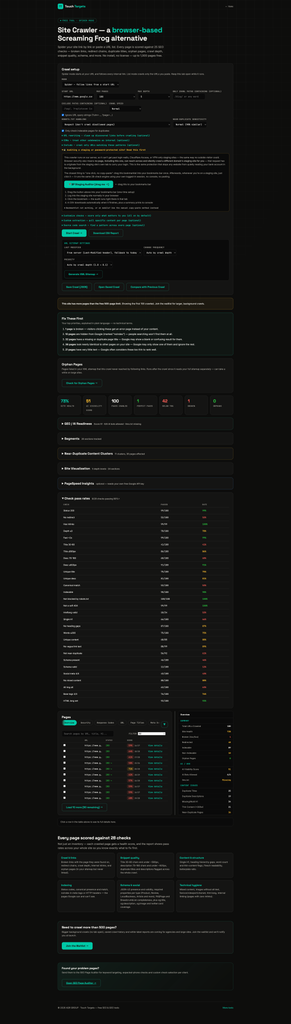
Google.com Site Crawl for 100 Pages
The Gap: What Existing Tools Don’t Do
Screaming Frog (the industry standard) It’s thorough and trusted, but it’s a desktop install, Java-based, and requires a paid license to unlock more than 500 URLs, custom extraction, and several other features. It has to run on a machine that’s turned on and connected for the whole crawl — not something you can kick off from a phone or a shared/locked-down work laptop.
Free online “SEO checker” tools Most single-page checkers only look at one URL at a time — they don’t spider a site, don’t build a duplicate-content picture across pages, and don’t track crawl depth or orphan pages, because that requires actually following links, not just scanning one page’s HTML.
Google Search Console Search Console shows you what Google has already indexed and its own crawl errors, but it’s reactive — it tells you what Google noticed, often weeks after the fact, and it doesn’t run the same real-time technical checks (title pixel width, near-duplicate clustering, schema property completeness) that a proper crawl does.
GEO / AI-visibility tools This is a newer need: as ChatGPT, Claude, Perplexity, and Gemini increasingly answer questions by pulling from live websites, whether those AI crawlers are even allowed to reach a site matters as much as traditional SEO. Almost no consumer-facing crawler checks this — most SEO tools were built before this became relevant and still only report on Googlebot.
Authenticated / staging sites Every server-side crawler — including Screaming Frog running through a proxy, and every hosted “enter a URL” tool — hits the same wall on a staging site behind a login, Cloudflare Access, or a VPN: the server has no browser session, so it just gets blocked. Nobody has a clean way to audit a site before it goes live without exporting cookies or fighting with VPN configs.
The common gap: nothing combines a full multi-page crawl, real SEO scoring across dozens of checks, near-duplicate detection, and now AI-crawler readiness, in a tool that needs no install, no license, and works from any browser — including, via a one-click bookmarklet, sites that require a login.
What We’re Providing: A Full Breakdown
1. Two Crawl Modes
Spider mode starts at one URL and follows every internal link it finds, exactly like a search engine would, up to a configurable depth and page limit. List mode crawls only a pasted list of specific URLs — useful for auditing a known set of pages (a migration list, a client’s priority pages) without touching the rest of the site.
2. 28 Real SEO Checks, Organized Into Six Categories
Every crawled page is scored against checks grouped into: Crawl & Links (status code, redirects, inlinks, crawl depth, response time), Snippet quality (title length in both characters and actual rendered pixel width, description length and pixel width, duplicate titles/descriptions across the whole crawl), Content & structure (single H1, heading hierarchy gaps, word count, Flesch readability score, boilerplate ratio), Indexing (status codes, canonical match, noindex directives from meta tags or HTTP headers, robots.txt blocking, soft-404 detection), Schema & social (JSON-LD presence and validity against Google’s actual required properties per type, Open Graph and Twitter Card coverage), and Technical hygiene (mixed content, missing alt text, viewport/charset/favicon, HTML lang attribute).
3. Pixel-Width Title and Description Checks — Not Just Character Counts
Most free tools only check title/description character counts (30-60, 70-160), but Google actually truncates based on rendered pixel width, and different letters take up different amounts of space. This tool calculates approximate pixel width for both title (≤580px) and description (≤920px), which is a meaningfully more accurate signal for whether a snippet will actually get cut off in search results.
4. Near-Duplicate Content Clustering (Not Just Exact-Match Duplicates)
Beyond flagging pages with byte-identical content, the crawler builds a 32-bit SimHash fingerprint of each page’s text (using word 4-shingles) and clusters pages whose fingerprints differ by only a few bits — the classic signature of templated or programmatic pages that only swap a city name, category, or product variant. This is genuinely rare in free tools and catches a category of duplicate-content risk that exact-match hashing completely misses.
5. Schema Validation Against Real Google Requirements
Rather than just checking whether JSON-LD exists, the tool validates each schema type against the actual properties Google requires to show rich results — for example, a Product needs image, offers.price, offers.priceCurrency, and offers.availability; a Review needs author.name and reviewRating.ratingValue. It covers over 25 schema types directly (LocalBusiness, Product, Review, Article, Event, Recipe, JobPosting, and more) plus dozens of common subtypes (Restaurant, Dentist, Electrician, HVACBusiness, and other LocalBusiness variants) that fall back to their base type’s requirements — built specifically with general small-business and local-service sites in mind.
6. GEO / AI Readiness Scoring
The tool checks whether a defined list of AI crawlers — GPTBot, ClaudeBot, PerplexityBot, Google-Extended, CCBot, Bytespider — are allowed or blocked in robots.txt, whether an llms.txt file exists, and whether a sitemap is declared. These feed into a weighted AI Visibility Score alongside schema completeness and answer-friendly content structure (headings phrased as questions). This directly addresses a blind spot in almost every other SEO tool: whether a site can even be found and cited by the AI assistants that are increasingly replacing traditional search for many users.
7. “Fix These First” — Plain-Language Priority List
Rather than handing over a wall of 28 checks and letting the reader figure out what matters, the tool surfaces the top five highest-impact issues in plain English — for example, “12 pages are hidden from Google (marked ‘noindex’) — people searching won’t find them at all,” or “Your site blocks 3 recognized AI tools (like ChatGPT or Claude) from reading it.” This is aimed squarely at the non-technical business owner who needs to know what to act on, not just a technical audit.
8. Orphan Page Detection
After the main crawl, an opt-in step reads the site’s XML sitemap(s) — including sitemap index files — and flags any URL that’s listed in the sitemap but was never reached by following links during the crawl. These are genuinely invisible pages: Google knows they exist because the sitemap says so, but nothing on the site actually links to them, which weakens their ranking potential.
9. Staging and Password-Protected Site Support
Since this crawler runs server-side, it hits the same wall as any outside visitor when a site is behind a login, Cloudflare Access, or a VPN. To solve this, there’s a one-time bookmarklet that runs the entire crawl engine directly inside the user’s own already-logged-in browser tab — inheriting their real session automatically, with no VPN configuration, no cookie exporting, and no console-pasting required after the first setup. A manual copy-paste console script is also offered as a fallback for anyone the bookmarklet doesn’t work for.
10. Custom Extraction and Source Code Search
Up to three custom fields can be defined with a label and a CSS selector (for example, pulling a price, an author name, or a rating from every page), and a separate regex-based source search can scan every crawled page’s raw HTML for a specific pattern — useful for confirming a tracking tag (like a GA4 or GTM ID) is present sitewide, or finding every page containing a specific phone number or phrase.
11. Crawl Comparison Over Time
A previously saved crawl (exported as JSON) can be loaded alongside a new one to produce a full diff: new pages, removed pages, and changed pages with a field-by-field breakdown of what changed (status, score, title, H1, canonical, noindex, word count), plus a before/after comparison of the AI Visibility Score. This turns one-off audits into an ongoing tracking process without needing a paid rank-tracking platform.
12. Site Visualization
A crawl-depth bar chart and a treemap of the site’s structure by URL segment (sized by page count, colored by average health score) give an at-a-glance picture of where a site’s problems concentrate — useful for spotting, for instance, that an entire /blog/ section is underperforming while /products/ is healthy.
13. Optional Real PageSpeed Data
For anyone willing to get a free Google API key, the tool can run Google’s actual PageSpeed Insights test (mobile) against crawled pages, rate-limited to stay within Google’s quotas, surfacing real Core Web Vitals data (LCP, CLS, TBT) per page rather than an estimate.
14. URL Rewriting, CDN Handling, and Include/Exclude Rules
Advanced crawl configuration lets a user strip tracking parameters, apply regex find-and-replace rules to discovered URLs before they’re crawled, treat specific CDN subdomains as internal, and restrict crawling to only URLs matching specific regex patterns — the kind of fine control usually reserved for paid desktop tools.
15. Full CSV and JSON Export
A completed crawl exports as a detailed CSV scorecard (summary stats, check pass rates, broken links, orphan pages, and full per-page detail across every field) or as a JSON file that can be reopened later or used as the “before” side of a comparison — with no data locked behind a paywall.
16. Free Up To 500 Pages, No License
The entire feature set above is available at no cost for crawls up to 500 pages — enough for the overwhelming majority of small and mid-sized business sites — with a waitlist for larger background crawls, saved crawl history, and white-label reporting for agencies working with bigger sites.
Use Cases in Practice
A business owner auditing their own site can run a full crawl from any browser, get an immediate plain-language “fix these first” list, and understand exactly what’s broken without needing to interpret 28 raw metrics themselves.
A freelancer or agency auditing a client’s site can use custom extraction to pull client-specific fields (prices, ratings), export a full CSV scorecard for a client report, and re-run the crawl monthly using the comparison feature to show measurable progress over time.
An in-house SEO or marketing manager can catch a staging site’s issues before launch using the bookmarklet, well before a redesign goes live and any problems become visible to real visitors and Google at the same time.
A team preparing for the AI-search era can check their AI Visibility Score to see whether GPTBot, ClaudeBot, and other AI crawlers are actually able to reach their site — a check that most SEO audits still don’t run, but which is quickly becoming as important as traditional search visibility.
A content team managing a large templated site (city-based service pages, programmatic SEO) can use near-duplicate clustering to catch templated pages that are similar enough to risk being treated as duplicate content by Google, before it affects rankings.
Getting Started
- Choose Spider mode (follow links from a start URL) or List mode (crawl only pasted URLs).
- Set a start URL, max pages, and max depth — defaults work well for most sites.
- Optionally customize which of the 28 checks to run, add custom extraction fields, or set a source-code search pattern.
- Click Start Crawl and watch the live progress bar; pause or stop at any time.
- Review the “Fix These First” summary at the top of the results for the highest-priority issues in plain language.
- Dig into the full Pages table by category tab (Titles, Schema, Content, and more) for line-by-line detail, or check the GEO/AI Readiness panel to see AI-crawler access.
- Run the optional Orphan Pages check against your sitemap, or PageSpeed Insights with your own API key, when ready.
- Export a full CSV scorecard, generate an XML sitemap directly from the crawl, or save the crawl as JSON to compare against next month’s results.
This content is generated from Claude based on the tool/platform performance.