
Why This Tool Exists
Every marketer, business owner, and agency runs into the same problem every single week: the industry moves faster than any one person can track. Google pushes an algorithm update, a new ad platform changes its bidding logic, an email deliverability rule shifts, and a benchmark you quoted to a client three months ago is already stale. Staying current means checking Search Engine Journal, then Ahrefs’ blog, then Digiday, then HubSpot, then Sprout Social, then whatever is trending on LinkedIn that day — and doing it again tomorrow.
Most people solve this by either (a) subscribing to five different newsletters and skimming none of them, (b) relying on whatever their agency tells them, which may be biased toward selling more of that agency’s services, or (c) giving up and making decisions on outdated assumptions. None of those are good options, and none of them are free of friction.
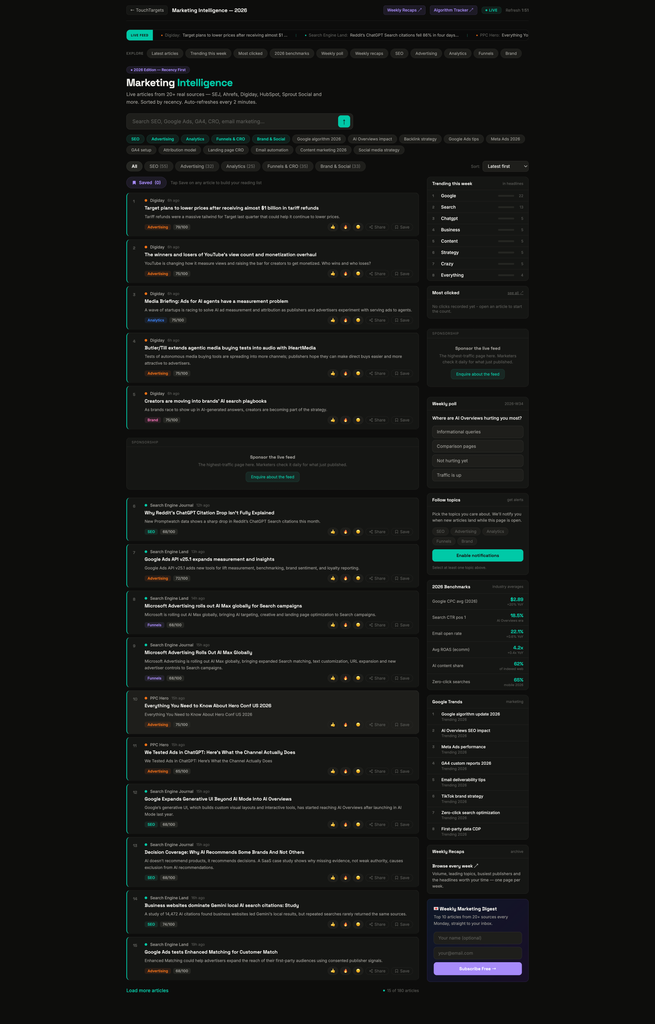
TouchTargets Marketing Intelligence was built to replace all of that with one live page: a real-time aggregation of 20+ actual marketing publications, refreshed automatically every two minutes, organized by discipline, and layered with tools that a raw RSS feed simply doesn’t have — engagement ranking, live benchmarks, trend detection, and a personal reading list, all without requiring a login or a subscription fee.
The Gap: What Existing Tools Don’t Do
To understand why this tool is useful, it helps to look at what marketers and business owners are already using, and where each one falls short.
Google Alerts and generic RSS readers (Feedly, Feedspot, Inoreader) These tools are built for broad content monitoring, not marketing specifically. They don’t know the difference between an SEO story and an advertising story — everything lands in one undifferentiated stream. There’s no ranking by importance, no sense of what other people are actually reading, and the useful filtering features (categories, saved searches, alerts) are usually locked behind a paid tier. You end up doing the categorization work yourself, every day.
Single-publisher blogs (Ahrefs, SEMrush, HubSpot, Moz) Each of these is excellent at covering its own corner of the industry, but that’s the problem — it’s one company’s take, often written to promote that company’s own product. If you only read Ahrefs, you get an SEO-tool-shaped view of SEO. If you only read HubSpot, everything looks like an inbound marketing problem. None of them aggregate what the rest of the industry is saying in the same place, so you either read one source and get a narrow view, or you manually visit five sites and lose twenty minutes a day just navigating between them.
Social monitoring (Twitter/X lists, LinkedIn feeds) Social platforms surface a lot of noise — hot takes, self-promotion, and recycled screenshots — with no reliable way to separate a credible industry data point from someone’s opinion thread. There’s also no persistent structure: today’s insight scrolls away and is gone tomorrow, with no archive, no benchmark reference, and no easy way to search back through what was said last month.
Paid marketing-intelligence platforms Enterprise tools exist that do real aggregation and analysis, but they’re priced and built for agencies and large marketing departments, not for a solo marketer, a freelancer, or a small business owner trying to keep an eye on the industry without a five-figure annual contract. They also require account creation, onboarding, and usually a sales call before you can even see what’s inside.
The common gap across all of the above: nothing combines (1) real aggregation across many credible sources, (2) a signal for what’s actually resonating — not just what was published most recently, (3) live, referenceable industry benchmarks, and (4) zero cost and zero login. That combination is exactly what this tool provides.
What We’re Providing: A Full Breakdown
1. Live, Multi-Source Aggregation
The feed pulls from more than 20 real marketing publications — including Search Engine Journal, Ahrefs, Digiday, HubSpot, and Sprout Social — and refreshes automatically every two minutes. There’s a visible countdown timer and a “LIVE” badge so it’s clear the page is actively pulling fresh content, not a static snapshot from this morning.
2. Discipline-Based Categorization
Every article is tagged into one of five categories: SEO, Advertising, Analytics, Funnels & CRO, or Brand & Social. A business owner who only cares about paid ads doesn’t have to wade through SEO technical deep-dives to find what’s relevant — one click on the “Advertising” filter narrows the entire feed instantly, and the count next to each category shows how much content exists in that bucket right now.
3. Multiple Sort Modes, Not Just “Newest”
Most feeds only sort by publish date. This tool offers four sort modes: Latest first (chronological), Priority (an internal relevance score), Most reacted (based on reader reactions), and Most clicked (based on actual click-throughs). This matters because the newest article isn’t always the most important one — sorting by engagement surfaces what the broader audience actually found worth reading, which is a much stronger signal for “what should I know about this week” than raw recency.
4. Trending This Week
Rather than relying on a human editor to guess what’s hot, the tool automatically scans the past seven days of real headlines, strips out common stopwords, and surfaces the keywords that are recurring most often across multiple sources — with a visual bar showing relative frequency. Click any trending term and it searches the full feed for it instantly. This is genuinely useful for content planning: if “AI Overviews” or “zero-click search” is trending across the industry this week, that’s a strong signal for what your own content or client reporting should address next.
5. Live 2026 Benchmarks Panel
This is one of the most practical features for non-marketers. The sidebar shows current industry-average figures — Google CPC, average search CTR at position one, email open rates, average ROAS for ecommerce, the share of indexed content that’s AI-generated, and the zero-click search rate on mobile — each with a year-over-year change indicator. A business owner who’s being quoted a CPC or ROAS number by an agency or freelancer can check it against this panel in seconds, without digging through a dozen separate industry reports to find a comparable figure.
6. Google Trends Sidebar
A secondary trend signal pulled directly from Google Trends data for marketing-related search terms, giving a second, independent read on where search demand and public interest are heading — useful alongside the headline-based “Trending This Week” panel for cross-checking whether a topic is just being written about, or actually being searched for.
7. Weekly Poll
A single rotating question each week, with live results shown as a percentage breakdown once you’ve voted. It’s a lightweight pulse-check on where the community stands on a current debate (for example, a platform change or a strategy shift), and it resets every Monday so it always reflects the current conversation.
8. Save For Later (Personal Reading List)
Every article has a Save button. Saved articles are stored in the browser (no account, no server-side profile) and are available in a dedicated “Saved” view that persists across visits. If someone wants to read something later in the day, or build a small personal library of reference articles for a client presentation, this replaces the need to open ten browser tabs or email links to themselves.
9. Reactions and Most Clicked
Readers can react to any article with a thumbs up, fire, or neutral-face reaction, and those counts are visible to everyone — a lightweight crowd signal on top of the raw article. Separately, the “Most Clicked” sidebar tracks which articles actually got opened the most, which is a more honest popularity signal than reactions alone, since it reflects real reader behavior rather than a quick tap.
10. Share With Built-In Attribution
Every article can be shared directly (using the native share sheet on mobile, or a copy-to-clipboard link on desktop), and every outbound link — whether opened directly or shared — carries UTM parameters back to the source. This means anyone sharing an article for a client report or a team Slack channel is automatically passing along proper attribution.
11. Follow Topics + Browser Alerts
Readers can select which categories they care about and enable browser notifications so new articles in those categories trigger an alert while the page is open in any tab — useful for someone who wants to leave the tab open in the background and get pinged only when something relevant to their business lands, rather than checking back manually.
12. New Since Last Visit
A banner automatically appears showing how many new articles have been published since your last visit, with a one-click option to filter down to only the new items. This solves the common problem of not knowing what’s actually changed since yesterday.
13. Free Weekly Email Digest
For people who don’t want to check a page at all, a one-field email signup delivers the top 10 articles from all 20+ sources every Monday, no cost, no account required beyond the email address itself.
14. No Login, No Cost, No Paywall
Every single feature above — saving, reacting, voting, following topics, alerts — works entirely without creating an account. Preferences are stored locally in the browser. This removes the single biggest point of friction that keeps people from using competing tools regularly: nobody has to sign up, verify an email, or hit a usage limit to get full functionality.
Use Cases in Practice
A solo marketer or freelancer can do a five-minute morning scan across SEO, ads, and analytics in one place instead of checking five bookmarked blogs, and save anything worth revisiting for later without needing a note-taking app.
A small business owner without a marketing background can use the Benchmarks panel as a reality check — if an agency quotes a CPC or ROAS figure, it can be compared instantly against the current industry average shown in the sidebar, giving non-experts a fast, low-effort way to evaluate whether a number sounds reasonable.
An in-house marketing manager can pull directly from “Trending This Week” when planning the next month’s content calendar, using real, current cross-industry signal instead of guessing what topics are worth covering.
Agencies reporting to clients can lift the current benchmark figures directly into a client report as a citable industry comparison point, with a live, refreshable source behind it rather than a static number from an old report.
Content and social teams can treat “Most Clicked” as a free proxy for industry-wide attention — if a particular story is getting real click-throughs across the feed, that’s a reasonable signal that a related piece of original content might also land well with the same audience.
Getting Started
- Land on the page — the feed loads pre-sorted by latest, showing all five categories together.
- Narrow the view using the category pills or keyword chips at the top if you only care about one discipline.
- Switch the sort dropdown to Priority or Most Reacted if you want signal over raw recency.
- Tap Save on anything worth revisiting — it will be waiting in the Saved view, no account required.
- Open Follow Topics in the sidebar and enable notifications if you’d rather be alerted than check back manually.
- Subscribe to the weekly digest if you prefer a Monday email over checking the page at all.
This content is generated from Claude based on the tool/platform performance.